


Digital & mobile bankingBank Wherever Life Takes You
Bank with DFCU anywhere you go. With digital and mobile banking services, you can securely manage your money anytime, anywhere. Our tools and services work for both business and personal banking accounts.

Secure, Convenient Banking at Your Fingertips
DFCU Online Banking
Manage your accounts from any browser, with real-time balances, Bill Pay, and Zelle transfers, without a branch visit.
DFCU Mobile Banking
Deposit checks, check balances, and control your cards from your phone, with all the power of DFCU Online right in your pocket.

Phone and Text (SMS) Banking**
Check balances, review history, and transfer funds with a quick phone call or text, no login, no app required.
Digital Wallets
Add your DFCU card to your phone’s digital wallet for fast, secure, contactless payments wherever you shop.

Wire Transfers
Send funds securely to almost any U.S. financial institution, with eSign available for faster processing.

Online Banking You Can Trust
Bank with us from your computer, tablet, or smartphone. DFCU online banking brings everyday account management and money-moving tools into one place, letting you go paperless with eDocuments.
Monitor your account with real-time balance information, including pending transactions.
Pay bills anytime, anywhere with Bill Pay or send fast, safe payments to friends and family with Zelle®.
Update your address, reorder checks, and personalize account nicknames and grouping.
Control your DFCU cards instantly with CardCMD.
DFCU Online – Banking In Your Pocket
DFCU Mobile, our app for iOS and Android, gives you all the same functionality as DFCU Online – so you can manage your accounts wherever you go.
Get all the same great features and functionality as DFCU Online.
See balances on up to five accounts with Quick Balance, no login required.
Log in securely with biometric authentication on enabled devices.
Deposit checks in seconds with Mobile Deposit. Learn more.
Control your DFCU cards instantly with CardCMD.






Manage Your Money by Phone or Text
No internet? No app? No problem. Check your balance, review recent transactions, or move money between accounts with a quick call or text anytime, day or night. It’s a fast, secure way to stay on top of your accounts when you’re away from your computer or phone app.
Call 888.336.2700 to check balances, review history, transfer funds, or make loan payments.
Text 226563 to check a balance, view history, or transfer funds.
Text HELP for commands, or STOP to turn off text access.
Enroll in DFCU Online under Settings > Text Enrollment and nickname each account.
Both are free from DFCU Financial; standard carrier messaging rates may apply.**
CardCMD
CardCMD lets you easily manage and protect your DFCU Financial credit and debit cards.

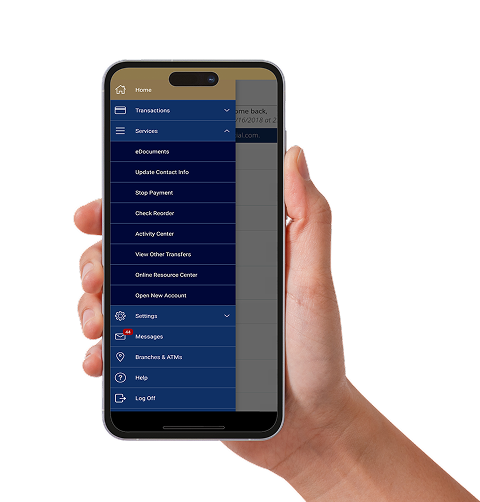
CheckFree Next Bill Pay
View and pay all your bills from a single, user-friendly dashboard. Save time by managing your bills all in one secure location. Staying on top of payments has never been easier.
Secure Documents With eSign
eSign, powered by DocuSign®, allows our members to securely sign documents using the highest levels of security.
Online Help & Support
Whether you’re setting up online banking for the first time or need a hand along the way, our team is ready to help.

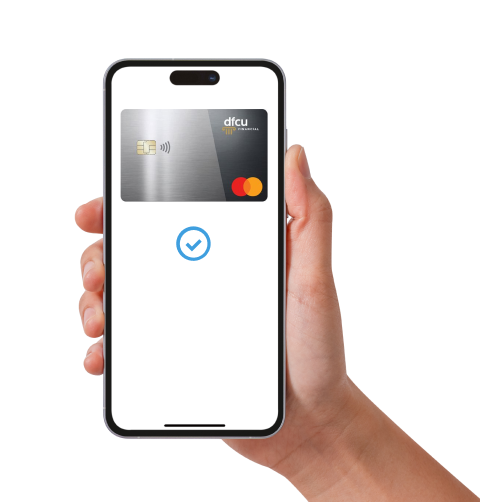

Your Wallet Just Got Smarter
A digital wallet makes everyday purchases quicker, easier, and more secure. It safely stores your payment information in your mobile device, like your DFCU debit Mastercard® and/or DFCU Platinum Mastercard® credit card. Think of it as a virtual version of your physical wallet.
Digital wallets are:
Safer: Protects your card number with secure tokenization, preventing merchants from seeing your full card details during payment.
Easier: Keep your eligible cards in one convenient place on your device.
Faster: Check out with confidence while still getting the speed and convenience of tap, click, or scan.
Wire Money to Almost Any U.S. Financial Institution
Closing on a home, paying a deposit, or sending a large payment? We’ll help you send it safely. Complete a Wire Transfer Authorization form online with eSign or in person at any branch, and send money safely and securely.
Have two forms of ID ready, your Member number, account details, and the receiving institution’s name and routing number.
Wires are processed Monday–Friday, 9 a.m.–4 p.m. ET; requests after hours or on weekends go out the next business day.
We’ll email a confirmation once your wire is on its way.

Frequently Asked Questions
Yes. DFCU Mobile supports biometric login on enabled devices, and CardCMD lets you lock or unlock your cards instantly if something looks off. Phone and text banking are protected by your member number and PIN.
CardCMD lets you monitor your DFCU Financial credit and debit cards. It also lets you control dependent purchases, and even lock your cards if they’re lost or stolen.
Features & benefits:
- Establish card controls to let DFCU know which transactions should be approved based on location, merchant types, transaction types, and spend limits.
- Tailor your alert preferences to your spending patterns and use them to notify you of unusual purchases.
- Easily view recent card transactions.
- Explore spend insights to view details about what, when, and where you have spent money using the card.
- Use the View Digital Card for card details that can be used to make online purchases or store with a merchant.
- Use the Card on File feature to see which merchants you have chosen to store your card information.
- Report lost or stolen cards.
- Order a replacement card.
- For credit cards, make a payment or see statements.
To use CardCMD, you will have to enroll in DFCU Online.
- Log in to your account using DFCU Online or DFCU Mobile.
- Select CardCMD in the menu located between Transactions and Services.
- Click Add Card and enter your 16-digit DFCU Financial card number, security code, and expiration date.
- You will be prompted to verify your identity with a unique code or number.
- Terms and Conditions will be presented; click Accept to complete the process.
- Repeat the process for additional cards.
Mobile Deposit is a service that allows you to deposit a check simply by taking a photo of it with your smartphone or tablet. The image is transmitted electronically to us, and your funds are deposited without you having to visit a DFCU Financial branch.
How do I use Mobile Deposit?
- Open the DFCU Mobile app.
- Select Menu, then select Transactions, then select Mobile Deposit.
- Select the account where you would like the funds to go and type in the amount of the check.
- Select Capture Image, then take a picture of the front and the back of the check.
- Review your pictures and retake them if necessary, then select Submit Deposit.
Am I eligible to use Mobile Deposit?
You’re eligible to use Mobile Deposit if:
- You have accessed DFCU Online and accepted the DFCU Online Access Agreement
- You have been a member for 30 days or more
- You are on an active account
- You are 14 years of age or older
- You have an aggregate deposit balance of $500.00 or more
- You live in the United States
- Additional restrictions may apply
How much can I deposit using Mobile Deposit?
Our members can deposit up to $10,000 per day with Mobile Deposit. Business Banking members can deposit up to $20,000 per day and up to $100,000 per month with Mobile Deposit.
What accounts can I deposit funds into using Mobile Deposit?
You can deposit funds into your DFCU Financial checking or savings accounts.
How do I endorse a check for Mobile Deposit?
On the back of the check, sign your name and print “For mobile deposit only at DFCU Financial.” If Mobile Deposit will not accept your check, please bring it to the DFCU Financial branch nearest you to make your deposit.
What do I do with checks after I make a Mobile Deposit?
We recommend keeping the check in a secure place for 90 days. After 90 days and confirmation of deposit (via your DFCU Online history or monthly account statement), you may destroy the check.
Can I make loan payments using Mobile Deposit?
While you can’t apply a check deposited with a mobile device directly to a loan, you can use DFCU Mobile to transfer available funds and apply them to a loan balance once the check has been posted to your checking or savings account.
How long will it take for my funds to become available using Mobile Deposit?
In most cases, checks will be posted immediately, and the funds will be available according to our Funds Availability Disclosure Policy.
Are there any types of checks that are not eligible for Mobile Deposit?
While you can deposit most checks through Mobile Deposit, there are some exceptions. The following types of checks are not eligible:
- Foreign checks
- Altered checks
- Incomplete items
- Non-negotiable items
- Non-readable or non-visible MICR line items
- Deposits from the same account that the deposit is crediting
- Torn or damaged checks
What do I do if the writing on my check is too light or difficult to read?
Our Mobile Deposit system reviews each check for image quality. If the system is unable to read your check, you will receive an error message; if this happens, please bring the check to the DFCU Financial branch or ATM nearest you.
Bill Pay support is available 24 hours a day, 7 days a week at 877.238.7277.
eSign, powered by DocuSign®, allows our members to securely sign documents using the highest levels of security to verify your identity and then encrypting the documents for the electronic transfer process between you and DFCU.
How it works:
- Email Notification: You’ll receive an email to review and sign your documents.
- Identity Verification: A link in your email will direct you to a few security questions to verify your identity.
- Signatures: Review the document; click to sign electronically where instructed (no need for special software).
- Confirmation Email: You and DFCU receive the signed document via email. If you do not create a DocuSign account, it’s important to keep your confirmation email to reference your signed documents later.
- Document Retention: Print or download a copy of your documents for your records.
Wires submitted Monday–Friday between 9 a.m. and 4 p.m. ET are typically processed the same day; anything after hours or on a weekend goes out the next business day. A fee applies to outgoing wires (see our current Fee Schedule), and the receiving or any intermediary bank may charge its own fee. We can’t guarantee same-day posting once funds reach the other institution.
Pause before you send. If a deal seems too good to be true, or someone is pressuring you to wire funds quickly, stop and verify. If instructions change suddenly by email, confirm with the beneficiary using a known phone number – not one provided in that email. We’ll always call you back to confirm a remotely submitted wire before it’s sent.
Call 888.336.2700, Monday through Friday from 9 a.m. to 5 p.m., or Saturday from 9 a.m. to 2 p.m.
Bank Smarter With These Solutions

Support You Can Count On
Whether you’re ready to join or just have questions, our team is here to help you move forward with confidence.
Financial Wellness Tips & Tools

DFCU Financial
New Online Banking DashboardBeginning Tuesday, March 10, DFCU Online will have a new look. These updates are designed to make your online banking experience cleaner, simpler, and easier to navigate.
Learn More
DFCU Financial
How Digital Wallets Work and Why They’re Worth UsingDigital wallets have emerged as a cornerstone of modern financial transactions. These convenient applications, often found on your smartphone, smartwatch, or computer, are rapidly transforming how we make purchases, store financial data, and manage our money. Learn more.
Learn More
DFCU Financial
Unlock the Power of Online & Mobile BankingIn today's digital era, this isn’t far from the truth. Mobile and online banking have simplified and redefined how we manage our finances. People are increasingly using digital banking services to securely monitor account activity, pay bills, and make daily purchases, whenever and wherever they please.
Learn MoreDFCU Financial
Beginning Tuesday, March 10, DFCU Online will have a new look. These updates are designed to make your online banking experience cleaner, simpler, and easier to navigate.
Learn MoreDFCU Financial
Digital wallets have emerged as a cornerstone of modern financial transactions. These convenient applications, often found on your smartphone, smartwatch, or computer, are rapidly transforming how we make purchases, store financial data, and manage our money. Learn more.
Learn MoreDFCU Financial
In today's digital era, this isn’t far from the truth. Mobile and online banking have simplified and redefined how we manage our finances. People are increasingly using digital banking services to securely monitor account activity, pay bills, and make daily purchases, whenever and wherever they please.
Learn More**Text Banking is free, but your mobile service provider may charge for sending and receiving text messages. Check with your service provider for details and specific charges that may apply for you.


